

A monthly subscription is usually the first way a membership site starts making money. But it shouldn’t be the only way.
Contents
A lot of site owners build everything around that one fee – working hard to get more members, reduce cancellations, and hoping the recurring revenue eventually becomes enough to carry the business.
However, the membership sites that last aren’t just running on subscriptions. They’re running layered revenue models where the subscription is the foundation, and other income streams stack on top of it.
That’s where the real opportunity is. This article breaks down the 3 revenue layers profitable membership sites are actually built on – so you can see exactly where yours stands and what it could be doing more of.
The 3 Layers of a Profitable Membership Site
A well-monetized membership site doesn’t rely on one income stream alone. It has 3 layers working together, with each one building on the last.
Layer 1: The Foundation – Your recurring revenue. The subscription fee members pay for access.
Layer 2: The Growth Multipliers – The extra revenue you generate from members you already have.
Layer 3: The Bigger Ecosystem – Where your membership becomes part of a larger business.
Most membership sites stop at Layer 1. That’s important to get right – but the bigger opportunity is in Layers 2 and 3, where a subscription product starts becoming a real business.
How this Should Look in Your Membership Site Setup
Most membership sites are one cancellation wave away from a bad month. When your entire revenue depends on how many people subscribed and how many didn’t quit, the business is fragile by design.
The sites that hold up are built differently. They still have subscribers – but they also have members buying one-time products, upgrading to higher tiers, purchasing courses, and coming back for things that go beyond their base plan.
And the audience they’ve built is quietly generating revenue through affiliate recommendations and product sales on top of all of that.
That’s what the 3 layers below are about.
Layer 1: Build a Strong Recurring Revenue Base
Recurring access is where most membership sites start. Members pay monthly or yearly to access your content, community, resources, or courses.
But the goal here isn’t just to get people through the door. It’s to build an access model that converts well, keeps members engaged, and makes upgrading feel like the obvious next step – not an upsell.
Here’s how:
Use Free Access to Move People Toward Paid Membership
A free tier or trial is a conversion tool. Some people need to experience your content before they feel ready to pay.
A free-to-paid funnel gives them that chance. It reduces the hesitation that kills sign-ups and brings in better-fit members who already know what they’re committing to.
WishList Member supports free membership levels, trial access, and Sneak Peek previews, so you can move visitors from curiosity to sign-up in one place.
WishList Member Feature: Sneak Peek + Partial Display
Show non-members a preview of your gated content and pair it with a call-to-action that nudges them toward signing up. You control the preview length and the prompt.
Create Tiered Access Levels
A single membership tier can work, but it also puts a ceiling on your revenue.
Tiered access gives members different ways to buy based on what they need. That could be Basic, Pro, and Elite, or any structure that fits your brand. The point is to offer multiple price points and create a natural upgrade path.
This matters because it’s usually easier to upgrade an existing member than to acquire a new one. Someone already inside your membership has context, experience with your content, and a reason to want more of it – that’s a very different conversation than selling to a stranger.
WishList Member supports unlimited membership levels, so there’s no structural limit on how you build this out.
Offer Both Monthly and Annual Pricing
Monthly and annual pricing each serve a different kind of buyer.
- Monthly plans lower the entry barrier for new members.
- Annual plans improve cash flow, reduce churn risk, and give committed members a way to save.
Running both means you’re not forcing a choice – you’re meeting people where they are.
Layer 2: Make More From the Members You Already Have
This is where many membership sites leave money on the table.
Your members have already bought into your world. They engage with your content, come back for more, and joined because you solve a real problem for them.
So at this layer, the goal isn’t only to chase new members. It’s to build revenue streams from the relationship you’ve already earned.
Sell One-Time Products and Premium Content
Not everything has to be included in the monthly subscription. Some resources are valuable enough to stand on their own.
Templates, toolkits, audits, swipe files, workshops, and resource packs can all be sold as one-time purchases – available to all members as add-ons, or reserved as upgrades for specific tiers.
Pay-per-post works the same way at the content level. A member on your base plan accesses everything their tier includes, while a higher-value piece – a deep-dive training, a detailed framework, an exclusive workshop recording – sits behind a separate purchase.
WishList Member supports pay-per-post natively, so individual pieces of content can be protected and sold without touching your broader membership setup.
Add Course Upsells Inside the Membership
Your members are already learning from you, so a course can be one of the most natural upsells to offer.
The audience is warm. And if the course helps them go deeper into the same problem your membership solves, the offer doesn’t feel random – it feels like the next step.
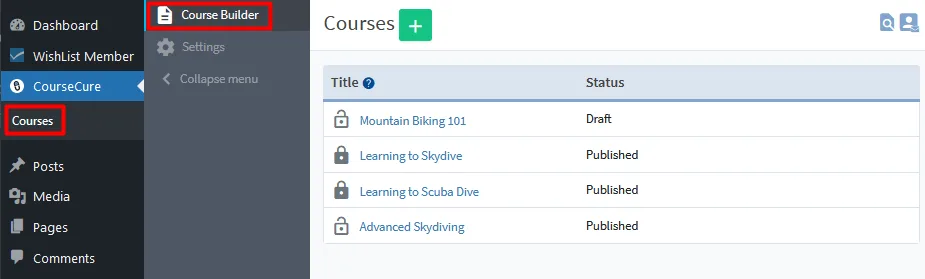
WishList Member includes CourseCure, a built-in course builder that lets you create and sell courses directly inside your membership.
You can add progress tracking, quizzes, badges, and points without needing a separate course platform – and because it’s built into WishList Member, your membership access rules apply to your courses automatically.
Create Upgrade Paths for Engaged Members
Tiered pricing gives members somewhere to go after they join. Someone might start on your basic plan, but as they get more value from your content, a higher level of access starts to make sense.
WishList Member’s Sequential Upgrade feature lets you automate that progression. You can move members into a new membership level based on a schedule you set – after 30 days, after 90 days, or after they complete a course.
Members start on a lower tier and move into higher-value access as they go deeper. That progression keeps them engaged, and engaged members stick around longer.
WishList Member Feature: Sequential Upgrades
Automatically move members to new levels based on timing or progression. Use it for drip content, onboarding paths, or structured tier upgrades.
Use Content Archiving to Encourage Members to Stay
Content archiving may not sound like a revenue feature at first, but it plays a strong role in retention.
With WishList Member’s Content Archiver, archived content remains available only to members who were active before the archive date. So if someone cancels and comes back later, they lose access to anything archived while they were gone.
That creates a real reason to stay subscribed. Instead of relying only on the promise of future content, you’re also protecting the value of what members already have – and that’s a retention pressure that works quietly in the background.
Layer 3: Build Revenue Around Your Membership
At this stage, your membership isn’t just a product people pay to access. It’s also an audience.
You’ve built a focused group of people who care about your niche and are actively looking for solutions. That kind of audience has value beyond the subscription fee – and that’s what this layer is about.
Earn Affiliate Revenue in Both Directions
The audience you’ve built inside your membership is an asset that can earn affiliate revenue in two ways :
- You can earn by recommending products to your members, or;
- by turning your members into affiliates who recommend you.
One points outward, one points inward, and there’s no reason you can’t run both.
Recommend Products to Your Members
Affiliate recommendations usually work better inside a membership than they do with cold traffic. Your members came to learn from you, so when you point them toward a tool or product that genuinely helps, it lands like advice instead of an ad.
That’s affiliate marketing in a nutshell: you recommend a product, and when a member buys through your link, you earn a commission. Built on top of a membership full of content, though, those links pile up fast — scattered across dozens of lessons, posts, and emails — and the raw URLs affiliate programs hand you are long, ugly, and the kind no one wants to click.
Our sister WordPress plugin, PrettyLinks, fixes that. It turns those raw links into clean, branded URLs and manages all of them from one spot in your WordPress dashboard, so they’re easy to update and automate across your membership site and courses.
Change a link’s destination once and every place it appears updates with it — and it tracks the clicks on each one, so you can see which recommendations your members actually act on and lean into the ones they convert on.
Turn Your Members Into Affiliates
The second direction flips the script: instead of you promoting other products, your members promote you. The people already paying for your membership and getting value from it are the most credible salespeople you could ask for — and Easy Affiliate turns that goodwill into a referral program of your own.
Your members (or anyone you approve) sign up as affiliates, get their own referral link, and earn a small commission whenever someone they send your way joins your membership or buys one of your courses.
Easy Affiliate runs on the same WordPress site as your membership, so it tracks who referred each sign-up and exactly what you owe them — and you only pay out when a referral actually converts.

Sell Products to Members Through WooCommerce
A membership can open up a product layer that runs alongside it.
With the WishList Member and WooCommerce integration, you can sell physical products, digital downloads, member-only items, or event access while WishList Member manages who gets access to what.
Members who buy a certain product can be added to a specific membership level automatically. Selected products can also be restricted so only members can purchase them.
WooCommerce handles the sale; WishList Member controls the access.
Audit Your Own Membership Revenue Stack
Most membership sites aren’t underperforming because the idea is bad. They’re underperforming because the revenue model is only half-built.
Here’s how to check where yours stands.
Layer 1: Your Recurring Revenue Base
- Do you have a free tier or trial that moves people toward paid membership?
- Do you offer multiple membership levels with clear differences in pricing, access, and value?
- Do you give members both monthly and annual pricing options?
Layer 2: Revenue From Existing Members
- Do you sell one-time products or pay-per-post content for your highest-value resources?
- Do you have a course, workshop, or structured training positioned as an upsell?
- Are you using Sequential Upgrades to create automatic progression paths?
- Are you using Content Archiver to give members a stronger reason to stay subscribed?
Layer 3: Revenue Around the Membership
- Are you earning affiliate revenue from tools or products you recommend inside your member content?
- Are you using WooCommerce to sell products, downloads, events, or member-only offers?
- Are there relevant brand partnerships or sponsorships that fit your audience?
The monthly fee gives the business its foundation. Everything else gives it room to grow.
Start Making More Money!
Most membership sites are one bad month away from a revenue problem. Not because the model is broken, but because it’s incomplete. The subscription fee gets the business started – the layers on top of it are what make it last.
Ready to build your membership site with the tools to support all three layers?
WishList Member gives you the infrastructure to go beyond the monthly fee from day one.
Enjoyed this article? Follow us on Twitter, Facebook, YouTube, and LinkedIn. Plus, get notified about feature updates, upgrades, and more when you subscribe to our newsletter!












This Post Has 2 Comments
One of the better guides I have read on this subject. The practical tips made it much more useful than the usual generic advice.
Very solid article. It is good to see someone focusing on fundamentals instead of shortcuts.