
Have you ever stared at the settings page of your membership site, completely frozen?
Contents
You’ve poured your heart into your content, built a community, and you’re ready to launch. But one question stops you: “How should I charge for this?”
It worries you even more because you know choosing the wrong strategy can lead to high churn and slow growth. But the good news is, there is a solution.
I’ve been there, and I’ve found that the key isn’t one “perfect” model, especially in 2026. The key is in finding the right fit for your specific community.
In this article, we’ll explore the subscription models that are actually working today. We’ll cover Tiered Pricing, Freemium, One-Time Plans, Pay-Per-Content, and smart Hybrid Models. I will be educating you on these trends, empowering you to choose the right one, and encouraging you to implement it. I’ve used tools like WishList Member to do exactly this, and you can too.
Let’s find the model that fits you.
The 5 Main Membership Models (and Which to Choose)
Okay, so how should you actually charge for your content? In 2026, you’ve got options. The key is to pick the one that makes the most sense for what you’re selling and what your audience wants.
Let’s look at the five main models I’ve seen work best.
Tiered Pricing
This is the classic “Bronze, Silver, Gold” idea. You offer a few different levels of access at different prices.
Example: Your “Bronze” plan might just be your community forum. The “Gold” plan gets the forum, all your courses, and a monthly live Q&A with you.
Tiered pricing lets people start small and upgrade later when they trust you more.
However, ensure not to offer too many tiers. If you give people five or six choices, they get confused and are more likely to just leave. Three is usually the magic number.
Freemium Access
This is where you offer a “free” level that’s open to everyone, forever. It’s not a temporary trial. This could be a free beginner’s course or access to a general part of your community. The goal is to show them so much value that they’ll want to pay to get your best stuff.
It’s a great way to get a large number of people to sign up and join your email list. In this type of subscription model, you have to support all of those free members, and only a small number of them will ever pay you. You have to be patient with this strategy.
One-Time Memberships
We’ve all felt “subscription fatigue” – that feeling of having too many monthly bills. This model is the perfect answer. Your member pays a single, larger fee to get access. This is often called a “Lifetime Plan.”
It’s a simple, clear deal. Your member pays once and is done. You get a helpful boost of cash right away.
But you need to be clear about what “lifetime” means. This works best for content that will be useful for a long time, like a signature course or a library of tools. It’s not a good fit if your members expect brand-new content from you every single week, forever.
Pay-Per-Content
This is your “à la carte” option. A customer doesn’t “join” your site in the traditional way. They just buy one thing. They want your “Baking Masterclass” for $100. They pay, they get that one course, and the transaction is finished.
This is perfect for the customer who hates monthly fees and just wants one specific problem solved. It also doesn’t build a steady, predictable income you can count on each month. It’s a series of one-off sales.
Hybrid Plans
This is my personal favorite, and I think it’s the smartest way to go in 2026. You don’t have to choose just one. You can combine them.
Here’s an example:
- You could have a Freemium level for your free community.
- You could offer a Tiered monthly plan for your “all-access” members.
- …AND you could also sell your biggest masterclass as a One-Time Purchase.
This way, you let every type of customer buy in the way that feels best for them.
This is exactly the kind of setup I’ve used WishList Member for. It’s built to handle this. I can create all these different levels, and even protect a single page or post for a one-time sale, all from one dashboard. It takes the “technical nightmare” out of building a flexible site that can make money in more ways than one.
And I would like to show you how I did it, but first let’s look at real-world examples of brands using these different types of model;
Real Examples: Seeing the Models in Action
These models are all around us. Once you see them, you can’t unsee them. Here’s how the biggest brands in the world use them.
Tiered Pricing: LinkedIn
LinkedIn is the perfect example of a tiered membership. At the base tier, everyone can have a free account to connect with people and post updates.
But they also offer “Premium” plans as the higher tiers. Premium Career ($29.99/mo) gives job seekers tools like InMail and allows them to see who viewed their profile. Premium Business ($59.99/mo) gives business owners more search tools.
This model succeeds because it’s a flawless upsell. They let you use the main product for free, but they hold back specific, high-value features for the people who really need them (like job seekers or sales teams) and are willing to pay.
Freemium: YouTube
YouTube is the master of the freemium model. Anyone can watch virtually unlimited videos for free. That’s the “free” part.
However, they have to watch ads. A lot of ads.
Yes, the free product is amazing, which attracts billions of users. But the ads are just annoying enough that a percentage of those users will happily pay for YouTube Premium to get an ad-free experience, plus perks like background play and video downloads.
One-Time Membership: Minecraft (or most video games)
Think about buying a big video game like Minecraft. You pay one price (around $30) one time, and you own the game forever.
It’s not a subscription. You pay once, you get the full product, and you can play it for the rest of your life. (Yes, they offer optional monthly subscriptions for servers called “Realms,” but the main game itself is a one-time purchase.
Why it succeeds? It’s a simple, high-trust deal. The customer knows exactly what they’re getting for their money, and they never have to worry about another bill. This is perfect for a big “flagship” course or a digital product.
Pay-Per-Content: Amazon Prime Video (Rent or Buy)
This is the “à la carte” model, and you’ve definitely used it. You’re scrolling through Amazon Video and see a new movie that just came out. It’s not “free with Prime.”
You have two “pay-per-content” options: pay $4.99 to rent it for 48 hours, or pay $19.99 to buy it and have it in your library forever. This is a single purchase for a single piece of content. I bet you would buy it.
This model lets customers buy only what they want, right when they want it, without committing to a new subscription.
Hybrid: Amazon Prime
Amazon itself is the ultimate hybrid model because they combine models perfectly.
They have a monthly/annual subscription (Amazon Prime) for “all-you-can-eat” free shipping and a library of free-to-stream videos.
They also use the Pay-Per-Content model for you to rent or buy those new movies (as we just saw).
It gets the best of both worlds. The subscription creates a loyal customer base, and the pay-per-content sales capture extra revenue from those same loyal customers.
This hybrid model is what I get most excited about. It’s so flexible, and it’s what I’ve personally done with WishList Member. It’s built to do this. You can have your main “Gold” monthly members, but also sell your new $300 masterclass as a “pay-per-post” one-time sale, all on the same site.
How I Built a Hybrid Model with WishList Member
You might be thinking, “Okay, the Amazon model sounds great, but Amazon has thousands of engineers. I’m just one person.”
I thought the same thing. I assumed running a subscription site AND selling one-off courses meant I needed two different websites, or some complex custom coding.
It turns out, the “Hybrid” model is actually built right into the core of WishList Member. It treats Membership Levels (subscriptions) and Pay-Per-Post (one-time buys) as two different tools that play perfectly together on the same site.
Here is exactly how I set it up in three steps:
Step 1: Set Up The “Subscription” (The Levels)
First, I established a home for my monthly subscribers. In the WishList Member dashboard, I simply went to Setup > Levels and created a new level called “Gold Member.” I set the access to “Ongoing,” which means as long as they pay, they stay.
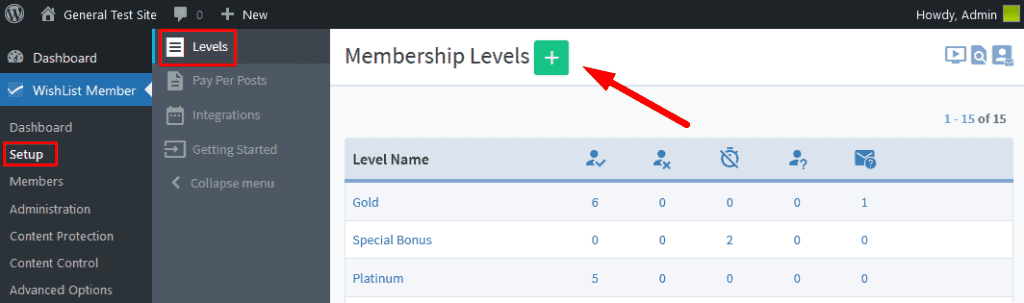
This level became the foundation for my community. Now, anyone who joins this level automatically unlocks all my basic category posts, like the forum, weekly tips, and the article library.
Step 2: Set Up The “One-Time Buy” (Pay-Per-Post)
Next, I wanted to sell my “Masterclass” separately without forcing people to join the monthly club. Instead of creating a whole new level, I went directly to the specific WordPress Page where my Masterclass content lives.
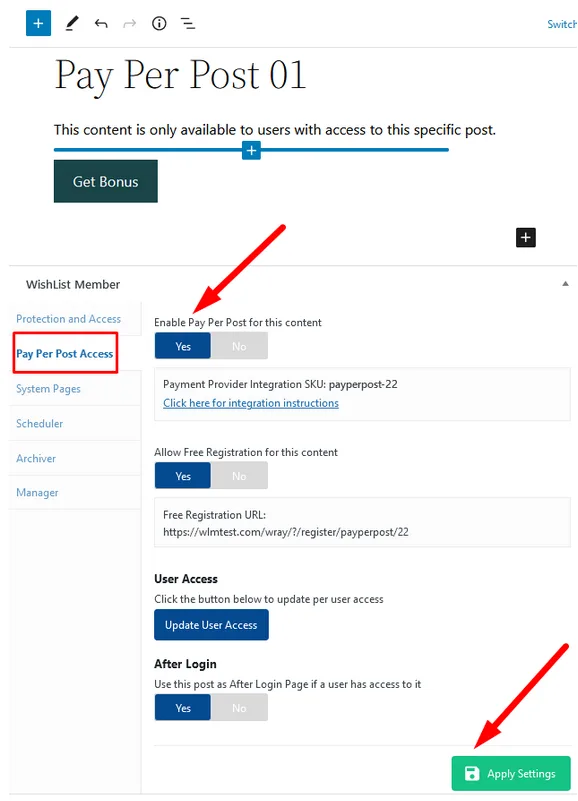
I scrolled down to the WishList Member settings box right on that page and turned on “Pay Per Post” protection. I set a one-time price, let’s say $150, and left it unassigned to any level. Now, that specific content is locked behind a paywall. Even a Gold Member can’t see it unless I give them access, but a stranger can buy just this page for a one-time fee.
Step 3: The Hybrid Model (How They Connect)
The magic happens when a user wants both. If a customer buys the Gold Membership, they get the Level access. If they later decide to buy the Masterclass, they get the Pay-Per-Post access added to their account.
WishList Member simply stacks these permissions on top of each other. The user has one login, one password, and access to exactly what they paid for.
For example;
If Taylor joins the Subscription and buys your “Gold Membership.” She creates a username and password. Now, whenever she logs in, she can see all the “Gold” content, like the community forum.
Next, Taylor sees the One-Time Course. She clicks on your “Masterclass” page. Even though she is logged in as a Gold member, she cannot see the video yet. Instead, she sees a message that says: “This course is sold separately. Click here to buy.”
Finally, Sarah buys the Course. She completes the purchase for the Masterclass. Because she is already logged in (or uses the same email address), WishList Member knows exactly who she is. It immediately adds the Masterclass access to her existing account.
Now, Sarah has one login that does two things. That single password opens the door to the Community (because she pays monthly) AND opens the door to the Masterclass (because she paid once). It is like having one key ring with two different keys on it.
This simple setup changed the game for me. It meant I stopped losing sales from people who hated subscriptions, but I kept the steady income from my loyal members. You don’t need a degree in computer science to do this. You just need a tool that lets you say “yes” to both types of customers at the same time.
How to Choose Your Perfect-Fit Model
Finally, the golden question: which one is right for you? The simple answer is the “best” model doesn’t exist, but the “best fit” does.
The right choice is simply a match between your audience and your content. Here is how I have learned to think about it.
First, Look at Who You Are Serving
You have to match their expectations. If your audience is brand new to your topic, they are probably nervous about spending a lot of money. A high-priced, “all-or-nothing” plan will scare them off. A Freemium plan or a low-cost “beginner” Tier is a perfect, low-risk way to say hello.
On the other hand, if you are serving busy professionals, they likely hate monthly fees. They just want one specific problem solved quickly. A Pay-Per-Content model for your big masterclass is exactly what they want because it respects their time and their wallet.
Second, Think About How They Buy
We are all human. In 2026, the two biggest feelings that stop a sale are “subscription fatigue” and “choice paralysis.”
Subscription fatigue is real. We are all tired of having a dozen small, recurring bills. This is exactly why the One-Time Membership model is so powerful right now. It is a single, simple decision. For the right customer, paying once feels like a relief.
Choice paralysis is the other trap. This is why I said to keep your Tiered model simple. If you give someone seven different options with confusing check boxes, their brain just shuts down. A confused mind always says “no.” Don’t make them think too hard.
Third, What Are You Actually Selling?
The type of content you make is the final piece of the puzzle.
If you are creating new content every week – like a new video, a new template, or a weekly live Q&A – that is an ongoing effort. You deserve to be paid for that work continuously. A monthly Tiered Subscription is the obvious fit here.
However, if you spent six months building one massive 20-hour course, that is a product, not a service. You should sell it as a One-Time Purchase.
Finally, if your main value is the community itself – a place where people can connect with each other – a simple, low-cost subscription is the best way to keep that group growing.
The Hybrid Solution
You might be reading this and thinking, “I have all three! I have a community, I make new videos, AND I have a big course.”
That is the point. You probably need a Hybrid Model. You want to sell your big course as a One-Time Purchase, and have a monthly Tiered plan for your community. This is where it all comes together. Being able to offer both options is the secret to capturing every type of customer and that is what you should go for.
Conclusion
Choosing your subscription model isn’t about finding one “magic” answer. As we have seen, the most successful sites in 2026 are moving away from a single “all-access” pass. They are using a smart mix of Tiered, Freemium, One-Time, and Pay-Per-Content models to meet their customers exactly where they are.
The biggest takeaway I want you to have is this: the model you choose today doesn’t have to be the one you keep forever.
The worst thing you can do is get stuck. Being able to listen to your audience and adapt is your new superpower. What worked in 2023 is already feeling old. 2026 is all about flexibility.
I have been through this transition myself, and the peace of mind that comes from knowing your platform can handle these changes is everything. That is why I am such a fan of WishList Member – it is the flexible foundation that lets you build any of these models, or all of them, without having to start from scratch every time your business needs to grow.
Your Next Steps
Here are a few resources to help you put this all into action:
1. Join the Discussion: I want to hear from you. What model are you using right now? Or, after reading this, which hybrid idea are you thinking of trying? Drop a comment below and let’s talk about it.
2. Read More: Here is a fantastic, deep-dive post on 8 Smart Membership Pricing Strategies that I highly recommend if you want to dig deeper into the numbers.
3. Run the Numbers: If you are wondering how these different models might actually affect your income, this Membership Site Revenue Calculator is a great, simple tool to play with the math.
4. See the Features: If you are curious to see exactly which buttons to click to build the hybrid model we discussed, you can see a full breakdown on the WishList Member features page.
5. If your mind is made up and you are ready to start implementing these subscription models in your business like a pro, get started right away with WishListMember.







This Post Has 6 Comments
Your passion for what you do shines through in every post It’s truly inspiring to see someone doing what they love and excelling at it
We appreciate it, Alden!
What a fantastic read! Thanks for sharing, I’ve definitely bookmarked your site for the future!
This was concise but still covered the important parts.
Thanks for your feedback, Jay!
I recently came across this website and was genuinely impressed by the quality of the service and the overall experience. The content is well organized, informative, and easy to understand. It’s clear that a lot of effort has gone into creating something useful and professional for visitors. I especially appreciated the attention to detail and the smooth user experience across the site. Finding reliable information online is not always easy these days, so discovering a platform like this was refreshing. I’ll definitely be recommending it to others who are interested in this topic. Looking forward to seeing more updates and new content in the future. Great work by the entire team.