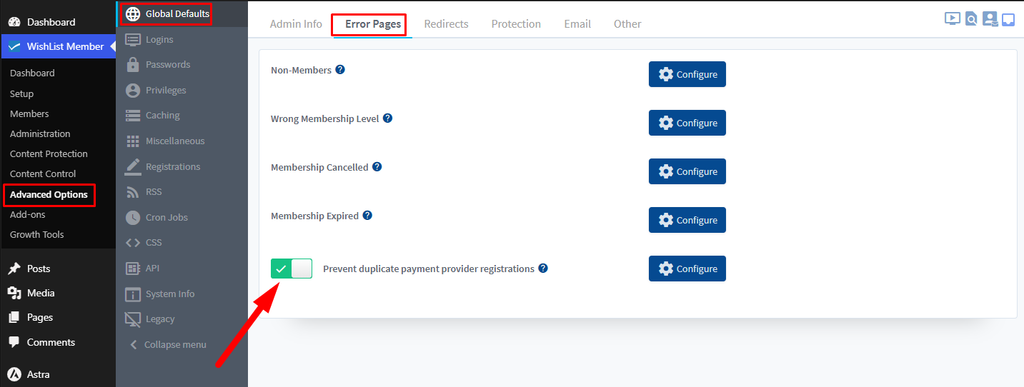
The Prevent duplicate payment provider registrations setting is in Advanced Options > Global Defaults > Error Pages. When it is enabled, WishList Member ignores a registration request from a payment provider if an identical request arrived within the last hour.
For example, a buyer may refresh the page or click the submit button more than once after payment. The repeated request does not create a second account. Instead, the buyer sees the error page described below.
The setting does not compare usernames or email addresses. It also does not prevent or remove incomplete registration records. For those records, see Member Doesn’t Finish Signing Up – Incomplete Registration.
—
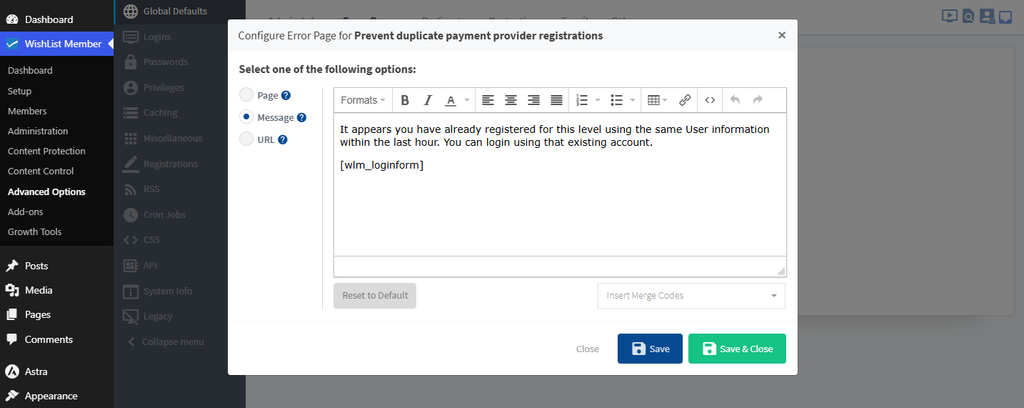
Configure an Error Page to show the buyer a message that explains what happened. Click Configure next to the setting, then select Page, Message or URL.
The default message states the following:
“It appears you have already registered for this level using the same User information within the last hour. You can login using that existing account.”
The default message also displays a login form.
Edit this message to change what the buyer sees.