
The New Member Registration emails can be sent to members on a Global Default basis or on a Per Level basis.
This means the Admin Notification email can also be enabled/disabled on a Per Level basis as well. So you can pick and choose if you would like to be notified when a new member joins one or more of your levels.
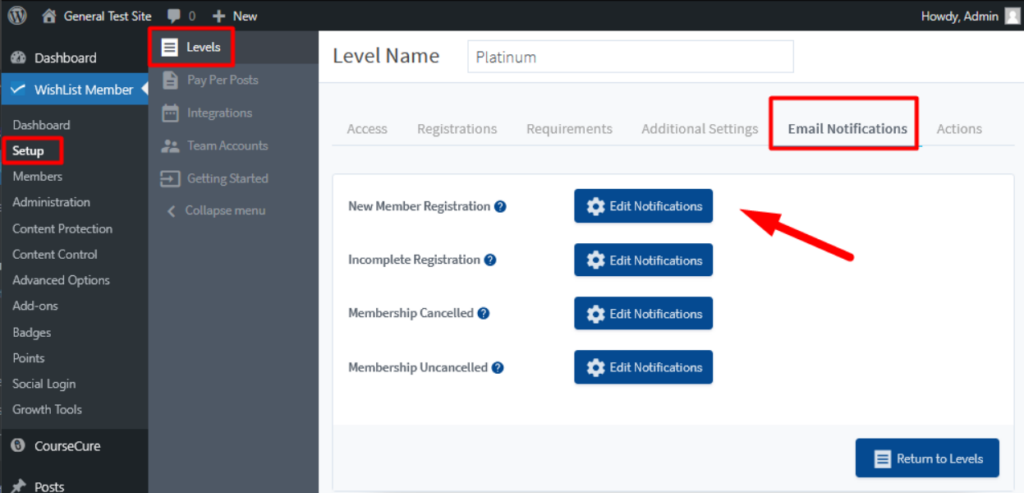
The Admin Notification email can be enabled/disabled for each level in the Setup > Levels > *Click to Edit Level* > Email Notifications section of WishList Member. You can click the Edit Notifications button that appears to configure the email settings.
—
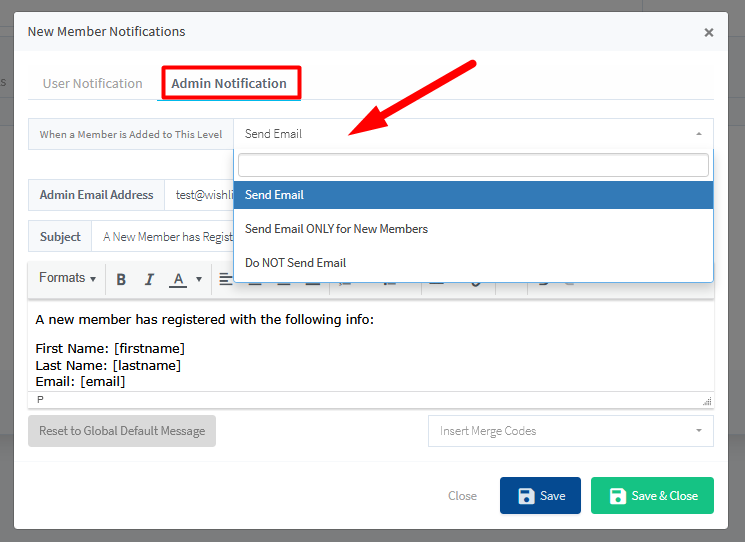
The New Member Notifications popup appears and you can select if you want the Admin Notification email to be sent.
There are three available options in the “When a Member is Added to This Level” dropdown:
- Send Email
- Send Email ONLY for New Members
- Do NOT Send Email
Selecting the Do NOT Send option will prevent notification emails from being sent to the site admin when a new member joins the level.
—