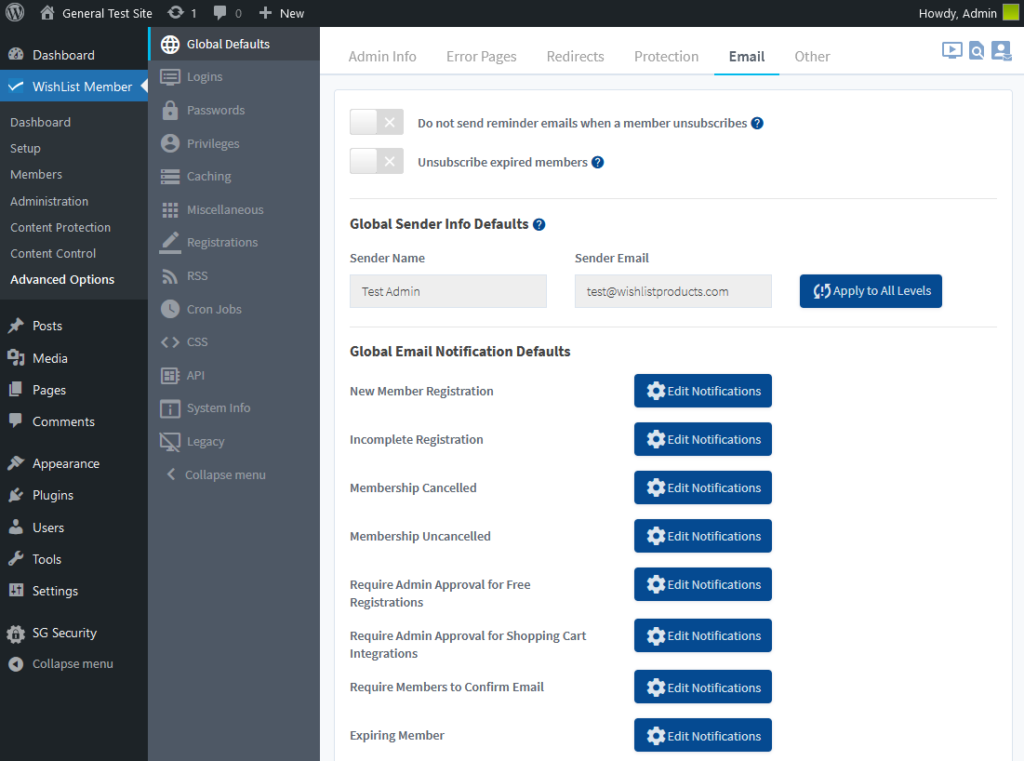
A number of notification emails can be edited and customized in the Advanced Options > Global Defaults > Email section of WishList Member.
These include emails to notify Members and the Site Admin of new members, cancelled members, registrations requiring approvals and more.
—
Video Tutorial
—
For Reference
The following is explained in the Tutorial Video above and is included here for quick reference. A selection of emails are included in the Global Email Notifications Defaults section.
New Member Registration: The email a New Member receives after joining a Level.
Incomplete Registration: The email a Member receives if they do not completely fill out the registration form. A link to complete the registration is included in the email.
Membership Cancelled: The email a Member receives if their access to the Level is Cancelled.
Membership Uncancelled: The email a Member receives if their access to the Level is Uncancelled.
Require Admin Approval for Free Registrations: The emails that are sent to the Member and to the site Admin during the approval process for a free Level.
- Notification to Admin: The email sent to the site Admin as a notification a Member is awaiting approval.
- User Awaiting Approval: The email sent to the Member informing them about the pending approval.
- User Approved: The email sent to the Member when they have been approved by the site Admin.
Require Admin Approval for Shopping Cart Integrations: The emails sent to the Member and to the site Admin during the approval process for a paid Level.
- Notification to Admin: The email sent to site Admin as a notification a Member is awaiting approval.
- User Awaiting Approval: The email sent to the Member informing them about the pending approval.
- User Approved: The email sent to the Member when they have been approved by the site Admin.
Require Members to Confirm Email: The emails sent to the Member during the Email Confirmation process for a Level.
- User Notification: The email a Member receives stating they need to confirm the registration using the link included in the email.
- User Notification Reminder: The email a Member receives with a reminder (If Needed) stating they need to confirm the registration using the link included in the email.
- Email Confirmed Notification: The email a Member receives after they confirm the registration.
Expiring Member: The emails sent to the Member and the site Admin if a Level is set to expire and the expiration date is approaching.
- User Notification: The email a User receives if they belong to a Level set to expire and the expiration date is approaching.
- Admin Notification: The email a site Admin receives if a User who belongs to a Level set to expire is approaching the expiration date.